MosquitoDB
latest
1. Overview
2. Getting Started
3. Project Management
4. Forms Management
5. User Management
6. Data Visualization
7. Settings
8. MosquitoDB App
8.1. Overview
8.2. App setup
8.3. Using the App
8.3.1. Login
8.3.2. Accessing a project
8.3.3. Enter Data
8.3.4. Edit Data
8.3.5. View Data
8.3.6. Submit Data
9. Appendix
MosquitoDB
»
8.
MosquitoDB App
»
8.3.
Using the App
»
8.3.5.
View Data
Edit on GitHub
8.3.5.
View Data
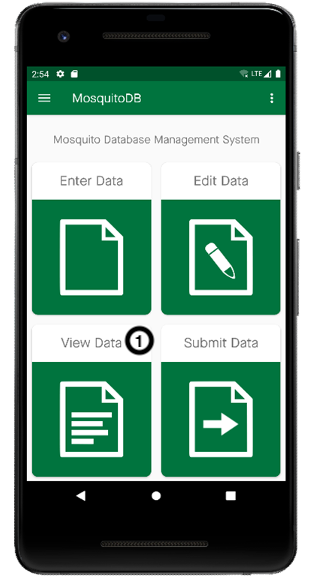
Step 1:
On the Home Page, Select
View Data
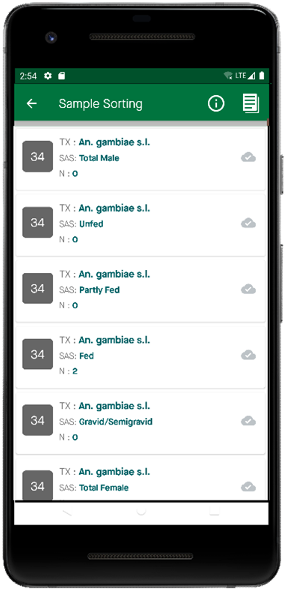
, then select the form whose data you want to view and e.g Sample Sorting
Step 2:
Select the data set you want to view
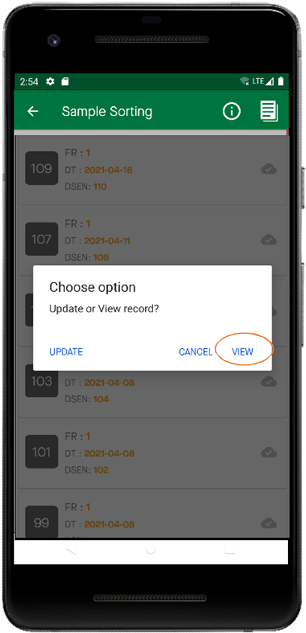
Step 3:
Click View